
To subscribe to email notifications:
- Do one of the following:
- In the Family portal: Click the Family tab.
- In the Student portal: Click the My Info tab.
- Click the Notification side-tab.
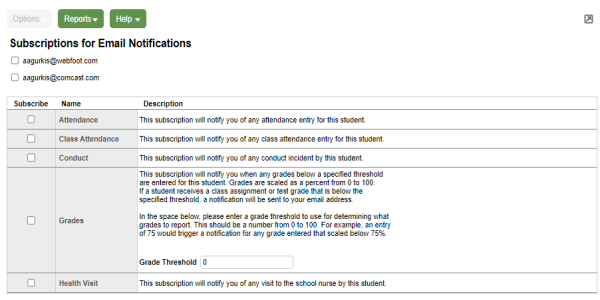
- At the top of the page, any email addresses associated with your account appear. Select the checkbox next to each email address you want to receive notifications.
- After viewing the description of each email, select the Subscribecheckbox if you want to receive that email notification.
Note: For the Grades notification, define a Grade Threshold between 1 and 100. The system will send an email when the student receives a grade below that percentage.
For each subscription, the system sends the appropriate messages to the designated email account. To view/change this account, click Set Preferences on the settings bar at the top of the page, then the Security sub-tab.
| Note: Your changes to this page are saved automatically. There is no Save button. |